Checking In on My Mid‑Summer Projects
I’ve been plugging along, blogging my little heart out, sharing whatever thoughts drift through my head, and since we’re smack in the middle of summer, I figured it was a good time to stop and take stock. Have I made any progress on the projects I’ve been yammering about?
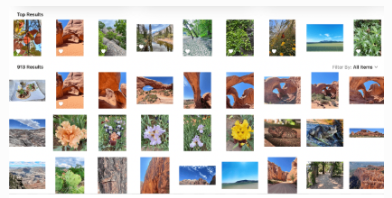
Six Months Deep Into the Great Photo Tagging Project
 The biggest one, of course, is the Great Photo Tagging Project — and yes, I’m still at it. I may skip a day here and there, but I always come back like a determined little homing pigeon. I started this madness in March, which means I’ve been working on it for almost six months now. (Six months at the end of August, but who’s counting? Oh right… me.)
To keep myself from getting lost in the digital swamp, I’ve learned the magic trick: keep a log. My photos are organized by month and year, and each page holds 20 pictures. So if a month has 40 photos, that’s two pages to tag. Simple math, but it keeps me from wandering off into the weeds.
I started with the newest photos first, and any time I add a picture, I tag it right away. My once‑humble 10,000‑photo library has now ballooned to 11,700, and I’m currently working on April 2017 — a month in which I apparently lived with my camera glued to my face, because I added 149 photos.
The WordPress Tagging Surprise That Changed Everything
But then I discovered something the other day that made me want to flop onto the floor like a fainting Victorian heroine. I was searching for a photo I knew I had tagged… and it wasn’t coming up. After much stumbling, muttering, and clicking around like a confused raccoon, I finally found it.
That’s when I realized the problem: WordPress only searches the file name, not the tags I’ve been adding inside the media editor.
Which means — brace yourself — if I tagged a photo but didn’t also put that tag in the actual file name, WordPress won’t find it. The tag might as well be written on a sticky note taped to my monitor. Completely useless.
So here’s the rule I learned the hard way: I can add tags to the file name if I separate them with commas, and that’s the only way WordPress will recognize them in a search. All those beautiful, carefully chosen tags I added the “normal” way? WordPress politely ignores them like a cat ignoring a $40 toy in favor of the cardboard box.
Which means that once I finish tagging all 15 years, 180 months, and 11,700 photos… I’ll need to go back and refine the file names so the tags actually work. Because if the tag isn’t in the file name, WordPress pretends it doesn’t exist.
Now, WordPress updates constantly, so maybe someday they’ll give us a better filtering system. Or maybe I’ll get better at tagging. Either way, I’m not giving up. Even with my bungling, I can see a major improvement in my organization.
 Tips for Anyone Tackling Their Own Photo Library Cleanup
So that’s my mid‑summer update. If I’ve inspired anyone else to tackle their photo library, I hope you’re having better luck than I am — or at least learning from my mistakes.
Here are a few tips I’ve picked up along the way:
- Put commas between tags in your file name.
- Make sure your tags match your file names. Add a general tag and a specific one (example: waterfall, Niagara Falls or birds, gulls).
- Track your progress. It keeps the overwhelm monster at bay.
- Take breaks. It took years to create the mess; it’ll take time to fix it.
Share your progress — and any tips — in the comments. I’d love to know if I’m the only Dummkopf lost in a photo‑archaeology dig, or if there are other brave souls out there with dust-covered digital archives of their own.
Share this:
- Share on Tumblr (Opens in new window) Tumblr
- Print (Opens in new window) Print
- Share on X (Opens in new window) X
- Share on Facebook (Opens in new window) Facebook
- Share on Pinterest (Opens in new window) Pinterest
- Share on Reddit (Opens in new window) Reddit
- Share on LinkedIn (Opens in new window) LinkedIn